Compare commits
2 Commits
start-of-f
...
loader-ope
| Author | SHA1 | Date | |
|---|---|---|---|

|
1e27410f50 | ||
|
|
8cb3cd4ddb |
@@ -10,14 +10,5 @@
|
||||
{ "title": "Deploying your PortalJS app", "href": "/docs/deploying-your-portaljs-app" }
|
||||
|
||||
]
|
||||
},
|
||||
{
|
||||
"title": "Developer FAQs",
|
||||
"links": [
|
||||
{ "title": "Analytics", "href": "/howto/analytics" },
|
||||
{ "title": "Page Metadata", "href": "/howto/page-metadata" },
|
||||
{ "title": "Sitemaps", "href": "/howto/sitemaps" },
|
||||
{ "title": "Data Rich Documents", "href": "/howto/drd" }
|
||||
]
|
||||
}
|
||||
]
|
||||
|
||||
@@ -1,281 +0,0 @@
|
||||
# How to have data rich documents with charts and tables?
|
||||
PortalJS comes with a library of components that provides essential pieces for your data portal. The best way to explore the components is to look at our [Storybook](https://storybook.portaljs.org/) that contains all the details on how to use them. Below is an overview of available components.
|
||||
|
||||
You can install the library with:
|
||||
```sh
|
||||
npm i @portaljs/components
|
||||
```
|
||||
|
||||
## Table
|
||||
|
||||
An easy-to-use table component with built-in pagination, search, and sorting.
|
||||

|
||||
|
||||
### Use with raw data
|
||||
|
||||
```js
|
||||
<Table
|
||||
cols={[
|
||||
{
|
||||
key: 'id',
|
||||
name: 'ID'
|
||||
},
|
||||
{
|
||||
key: 'firstName',
|
||||
name: 'First name'
|
||||
},
|
||||
{
|
||||
key: 'lastName',
|
||||
name: 'Last name'
|
||||
},
|
||||
{
|
||||
key: 'age',
|
||||
name: 'Age'
|
||||
}
|
||||
]}
|
||||
data={[
|
||||
{
|
||||
age: 35,
|
||||
firstName: 'Jon',
|
||||
id: 1,
|
||||
lastName: 'Snow'
|
||||
},
|
||||
{
|
||||
age: 42,
|
||||
firstName: 'Cersei',
|
||||
id: 2,
|
||||
lastName: 'Lannister'
|
||||
}
|
||||
]}
|
||||
/>
|
||||
```
|
||||
|
||||
- It can be used by passing a raw csv string
|
||||

|
||||
|
||||
```js
|
||||
<Table
|
||||
csv="
|
||||
Year,Temp Anomaly
|
||||
1850,-0.418
|
||||
2020,0.923
|
||||
"
|
||||
/>
|
||||
```
|
||||
|
||||
- It can be used by passing a URL string
|
||||

|
||||
|
||||
```js
|
||||
<Table url="https://raw.githubusercontent.com/datasets/finance-vix/main/data/vix-daily.csv" />
|
||||
```
|
||||
|
||||
- More info on the [storybook page](https://storybook.portaljs.org/?path=/docs/components-table--docs)
|
||||
|
||||
## Charts
|
||||
|
||||
### Linecharts
|
||||
|
||||
- You can add simple line charts with the `<LineChart>` component
|
||||
- Here is an example passing in a array of data
|
||||

|
||||
|
||||
```js
|
||||
<LineChart
|
||||
data={[
|
||||
[
|
||||
'1850',
|
||||
-0.41765878
|
||||
],
|
||||
[
|
||||
'1851',
|
||||
-0.2333498
|
||||
],
|
||||
[
|
||||
'1852',
|
||||
-0.22939907
|
||||
],
|
||||
[
|
||||
'1853',
|
||||
-0.27035445
|
||||
],
|
||||
[
|
||||
'1854',
|
||||
-0.29163003
|
||||
]
|
||||
]}
|
||||
/>
|
||||
```
|
||||
- And here passing an url
|
||||

|
||||
|
||||
```js
|
||||
<LineChart
|
||||
data="https://raw.githubusercontent.com/datasets/oil-prices/main/data/wti-year.csv"
|
||||
title="Oil Price x Year"
|
||||
xAxis="Date"
|
||||
yAxis="Price"
|
||||
/>
|
||||
```
|
||||
|
||||
- More info on the [storybook page](https://storybook.portaljs.org/?path=/docs/components-linechart--docs)
|
||||
|
||||
### Vega Charts
|
||||
|
||||
You can add Vega charts with the `<Vega />` component like this, it supports all the Vega specification:
|
||||
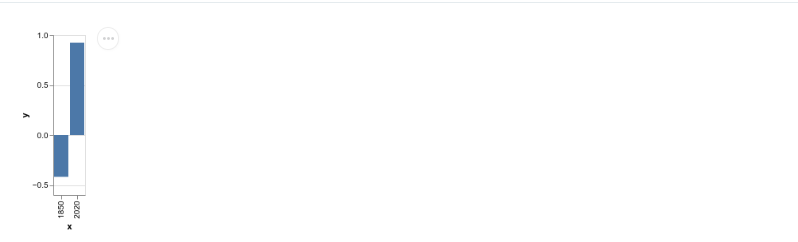
|
||||
|
||||
```js
|
||||
<Vega
|
||||
data={{
|
||||
table: [
|
||||
{
|
||||
x: 1850,
|
||||
y: -0.418
|
||||
},
|
||||
{
|
||||
x: 2020,
|
||||
y: 0.923
|
||||
}
|
||||
]
|
||||
}}
|
||||
spec={{
|
||||
$schema: 'https://vega.github.io/schema/vega-lite/v4.json',
|
||||
data: {
|
||||
name: 'table'
|
||||
},
|
||||
encoding: {
|
||||
x: {
|
||||
field: 'x',
|
||||
type: 'ordinal'
|
||||
},
|
||||
y: {
|
||||
field: 'y',
|
||||
type: 'quantitative'
|
||||
}
|
||||
},
|
||||
mark: 'bar'
|
||||
}}
|
||||
/>
|
||||
```
|
||||
- More info on the [storybook page](https://storybook.portaljs.org/?path=/docs/components-vega--docs)
|
||||
|
||||
## VegaLite chart
|
||||
|
||||
A wrapper around the [Vega Lite specification](https://vega.github.io/vega-lite/) which allows for a more concise grammar than Vega around the building of charts.
|
||||
|
||||

|
||||
|
||||
```js
|
||||
<VegaLite
|
||||
data={{
|
||||
table: [
|
||||
{
|
||||
x: 1850,
|
||||
y: -0.418
|
||||
},
|
||||
{
|
||||
x: 2020,
|
||||
y: 0.923
|
||||
}
|
||||
]
|
||||
}}
|
||||
spec={{
|
||||
$schema: 'https://vega.github.io/schema/vega-lite/v4.json',
|
||||
data: {
|
||||
name: 'table'
|
||||
},
|
||||
encoding: {
|
||||
x: {
|
||||
field: 'x',
|
||||
type: 'ordinal'
|
||||
},
|
||||
y: {
|
||||
field: 'y',
|
||||
type: 'quantitative'
|
||||
}
|
||||
},
|
||||
mark: 'bar'
|
||||
}}
|
||||
/>
|
||||
```
|
||||
|
||||
>[!info]
|
||||
> More info on the [storybook page](https://storybook.portaljs.org/?path=/docs/components-vegalite--docs)
|
||||
|
||||
## Catalog
|
||||
|
||||
A searchable catalog that will index a list of datasets and allow for contextual searching + filters.
|
||||

|
||||
- The dataset object requires the following structure(the metadata field can have any structure that you may want)
|
||||
|
||||
```js
|
||||
<Catalog
|
||||
datasets={[
|
||||
{
|
||||
_id: '07026b22d49916754df1dc8ffb9ccd1c31878aae',
|
||||
metadata: {
|
||||
'details-of-task': 'Detect and categorise abusive language in social media data',
|
||||
language: 'Albanian',
|
||||
'level-of-annotation': [
|
||||
'Posts'
|
||||
],
|
||||
'link-to-data': 'https://doi.org/10.6084/m9.figshare.19333298.v1',
|
||||
'link-to-publication': 'https://arxiv.org/abs/2107.13592',
|
||||
medium: [
|
||||
'Text'
|
||||
],
|
||||
'percentage-abusive': 13.2,
|
||||
platform: [
|
||||
'Instagram',
|
||||
'Youtube'
|
||||
],
|
||||
reference: 'Nurce, E., Keci, J., Derczynski, L., 2021. Detecting Abusive Albanian. arXiv:2107.13592',
|
||||
'size-of-dataset': 11874,
|
||||
'task-description': 'Hierarchical (offensive/not; untargeted/targeted; person/group/other)',
|
||||
title: 'Detecting Abusive Albanian'
|
||||
},
|
||||
url_path: 'dataset-4'
|
||||
},
|
||||
]}
|
||||
/>
|
||||
```
|
||||
|
||||
- You can also add facets that are going to act as filters for your metadata
|
||||

|
||||
|
||||
```js
|
||||
<Catalog
|
||||
datasets={[
|
||||
{
|
||||
_id: '07026b22d49916754df1dc8ffb9ccd1c31878aae',
|
||||
metadata: {
|
||||
'details-of-task': 'Detect and categorise abusive language in social media data',
|
||||
language: 'Albanian',
|
||||
'level-of-annotation': [
|
||||
'Posts'
|
||||
],
|
||||
'link-to-data': 'https://doi.org/10.6084/m9.figshare.19333298.v1',
|
||||
'link-to-publication': 'https://arxiv.org/abs/2107.13592',
|
||||
medium: [
|
||||
'Text'
|
||||
],
|
||||
'percentage-abusive': 13.2,
|
||||
platform: [
|
||||
'Instagram',
|
||||
'Youtube'
|
||||
],
|
||||
reference: 'Nurce, E., Keci, J., Derczynski, L., 2021. Detecting Abusive Albanian. arXiv:2107.13592',
|
||||
'size-of-dataset': 11874,
|
||||
'task-description': 'Hierarchical (offensive/not; untargeted/targeted; person/group/other)',
|
||||
title: 'Detecting Abusive Albanian'
|
||||
},
|
||||
url_path: 'dataset-4'
|
||||
},
|
||||
]}
|
||||
facets={['platform', 'language']}
|
||||
/>
|
||||
```
|
||||
|
||||
>[!info]
|
||||
> More info on the [storybook page](https://storybook.portaljs.org/?path=/docs/components-catalog--docs)
|
||||
@@ -63,7 +63,7 @@ export const getStaticProps: GetStaticProps = async ({
|
||||
}
|
||||
|
||||
// Temporary, docs pages should present the LHS sidebar
|
||||
if (dbFile.url_path.startsWith('docs') || dbFile.url_path.startsWith('howto')) {
|
||||
if (dbFile.url_path.startsWith('docs')) {
|
||||
frontMatter.showSidebar = true;
|
||||
frontMatter.sidebarTreeFile = 'content/assets/sidebar.json';
|
||||
}
|
||||
|
||||
Reference in New Issue
Block a user