
4.3 KiB
4.3 KiB
How to have data rich documents with charts and tables?
PortalJS comes with a library of components that provides essential pieces for your data portal. The best way to explore the components is to look at our Storybook that contains all the details on how to use them. Below is an overview of available components.
You can install the library with:
npm i @portaljs/components
## Table
An easy-to-use table component with built-in pagination, search, and sorting.

### Use with raw data
- It can be used by passing a raw csv string

<Table
  csv="
    Year,Temp Anomaly
    1850,-0.418
    2020,0.923
    "
 />
- It can be used by passing a URL string

<Table url="https://raw.githubusercontent.com/datasets/finance-vix/main/data/vix-daily.csv" />
- More info on the storybook page
Charts
Linecharts
- You can add simple line charts with the
<LineChart>component - Here is an example passing in a array of data

<LineChart
  data={[
    [
      '1850',
      -0.41765878
    ],
    [
      '1851',
      -0.2333498
    ],
    [
      '1852',
      -0.22939907
    ],
    [
      '1853',
      -0.27035445
    ],
    [
      '1854',
      -0.29163003
    ]
  ]}
 />
- And here passing an url

<LineChart
  data="https://raw.githubusercontent.com/datasets/oil-prices/main/data/wti-year.csv"
  title="Oil Price x Year"
  xAxis="Date"
  yAxis="Price"
/>
- More info on the storybook page
Vega Charts
You can add Vega charts with the <Vega /> component like this, it supports all the Vega specification:
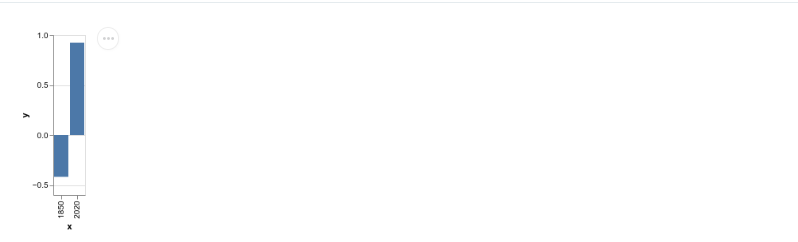
<Vega
  data={{
    table: [
      {
        x: 1850,
        y: -0.418
      },
      {
        x: 2020,
        y: 0.923
      }
    ]
  }}
  spec={{
    $schema: 'https://vega.github.io/schema/vega-lite/v4.json',
    data: {
      name: 'table'
    },
    encoding: {
      x: {
        field: 'x',
        type: 'ordinal'
      },
      y: {
        field: 'y',
        type: 'quantitative'
      }
    },
    mark: 'bar'
  }}
/>
- More info on the storybook page
VegaLite Charts
- You can add VegaLite charts with the
<VegaLite />component like this, it supports all the VegaLite specification:
<VegaLite
  data={{
    table: [
      {
        x: 1850,
        y: -0.418
      },
      {
        x: 2020,
        y: 0.923
      }
    ]
  }}
  spec={{
    $schema: 'https://vega.github.io/schema/vega-lite/v4.json',
    data: {
      name: 'table'
    },
    encoding: {
      x: {
        field: 'x',
        type: 'ordinal'
      },
      y: {
        field: 'y',
        type: 'quantitative'
      }
    },
    mark: 'bar'
  }}
/>
- More info on the storybook page
Catalog
- You can add a
<Catalog>component that takes a list of dataset and will provide you with a searchable interface.
- The dataset object requires the following structure
_id //A unique identifique for the item in the catalog
metadata //The dataset metadata
url_path //The url for the dataset showcase page
-
You can also add facets that are going to act as filters for your metadata

-
More info on the storybook page