
7.3 KiB
Deploying a single page dataset to Github pages
In the following sections, we show you how to deploy a single page, Frictionless dataset to Github pages. We show you three ways to do this as listed below:
- Deploying datasets automatically by setting up a github actions script.
- Deploying datasets from a local bash script with portal code commits
- Deploying datasets from a local bash script without portal code commits
Deploying datasets automatically by setting up a github actions script.
The github actions below will automatically build and deploy a single page, Frictionless dataset to gh-pages branch. Folow the steps below to achieve this:
Step 1
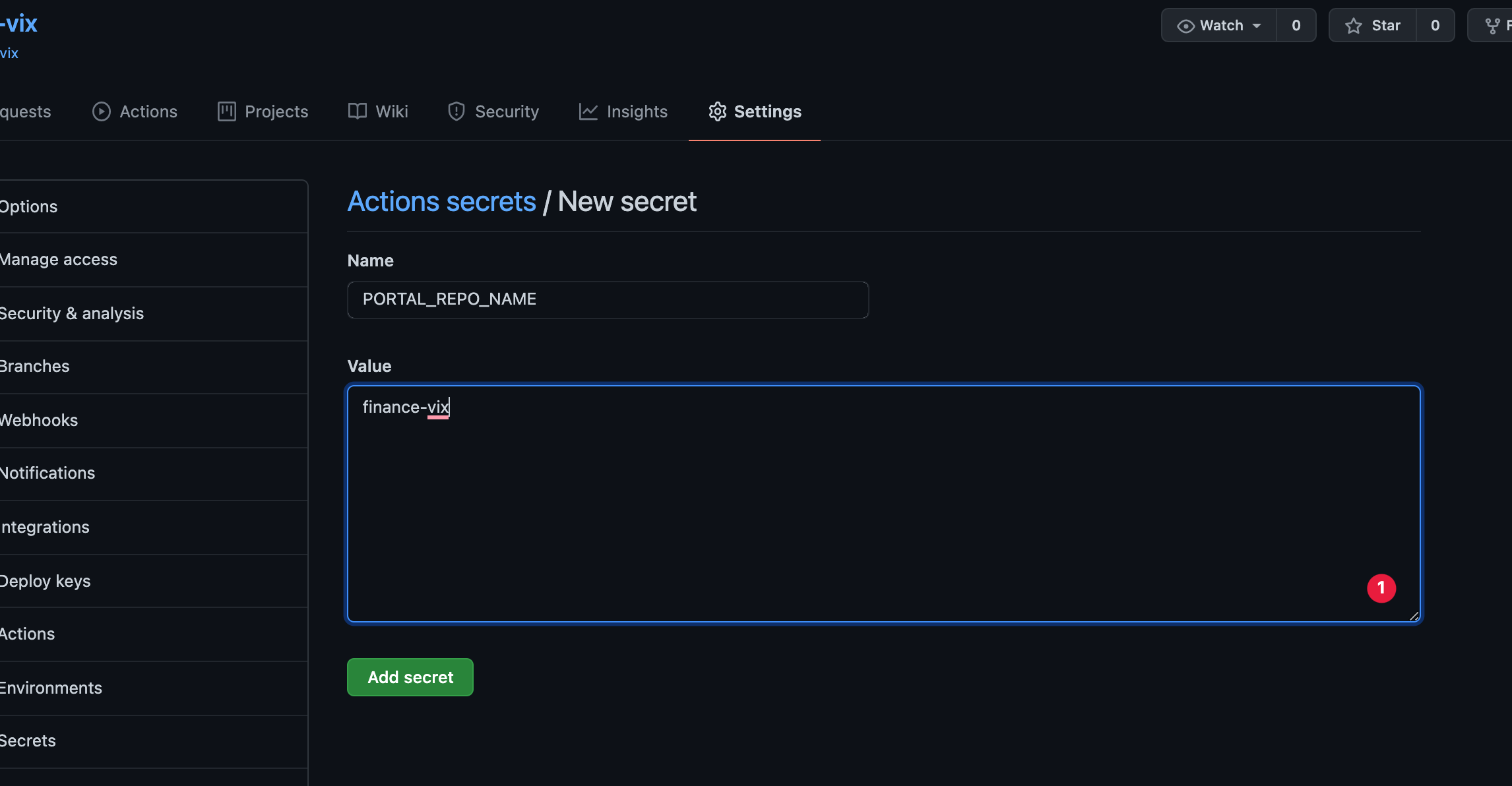
In the dataset repository you want to deploy, create a github secret with the name PORTAL_REPO_NAME and the value should be the name of the repository.
See steps on creating a secret here
Step 2
Clone/Pull the dataset repository you want deploy:
git clone https://github.com/datasets/finance-vix
Step 3
Create a .github/workflow directory and add a main.yml file with the following content:
name: github pages

on:
  push:
    branches:
      - master
      - main

jobs:
  run:
    runs-on: ubuntu-latest
    steps:
    - uses: actions/checkout@v2
    - name: Setup Node
      uses: actions/setup-node@v2.1.2
      with:
        node-version: '12.x'

    - name: Build datasets
      env:
        PORTAL_REPO_NAME: ${{ secrets.PORTAL_REPO_NAME }}
      run: |
        curl https://raw.githubusercontent.com/datopian/portal.js/main/scripts/single-dataset-no-commit.sh > portal.sh
        git config --local user.email "$(git log --format='%ae' HEAD^!)"
        git config --local user.name "$(git log --format='%an' HEAD^!)"
        source ./portal.sh
You can see/download the action file here
Step 3
Commit and push your code:
git add .
git commit -m "Build dataset page"
git push
Step 4
Wait for a while as your page builds, and once you see the green check mark, navigate to your repository's github pages in settings, set the source to gh-pages and folder to /root:

Step 5
Open your deployed site at https://<your github username>/github.io/<dataset repo name>/index.html
Deploy single dataset without commiting portal.js code
Users who want to deploy datasets from a local bash script without saving/commiting the portal.js code, can use the script shown below.
Using this script means you do not have access to the portal.js code used to generate the dataset page, and as such cannot modify/extend it.
This script creates and commit only the build/output files to the gh-pages branch. Follow the steps below to achieve this.
Step 1
Clone/Pull the dataset repository you want deploy. For example:
git clone https://github.com/datasets/finance-vix
cd finance-vix
Step 2
In a terminal, export an env variable with the name of your dataset github repo. For example if deploying https://github.com/datasets/finance-vix, then export the name as:
export PORTAL_REPO_NAME=finance-vix
Step 3
In the dataset repository's root folder, create a file called portal.sh and paste the following content:
#!/bin/bash
git checkout -b gh-pages
git rm -r --cached .
rm -rf portal
mkdir -p portal
npx create-next-app portal -e https://github.com/datopian/portal.js/tree/main/examples/dataset-frictionless
mkdir portal/public/dataset

cp -a ./data portal/public/dataset
cp -a ./datapackage.json portal/public/dataset
cp -a ./README.md portal/public/dataset

PORTAL_DATASET_PATH=$PWD"/portal/public/dataset"
export PORTAL_DATASET_PATH

cd portal
assetPrefix='"/'$PORTAL_REPO_NAME'/"'
basePath='"/'$PORTAL_REPO_NAME'"'
echo 'module.exports = {assetPrefix:' ${assetPrefix}', basePath: '${basePath}' }' > next.config.js ## This ensures css and public folder works
yarn export

cd ..
cp -R -a portal/out/* ./
touch .nojekyll
git add $PWD'/_next' $PWD'/index.html' $PWD'/dataset' $PWD'/404.html' $PWD'/.nojekyll' $PWD'/favicon.ico'
git commit -m "Build new dataset page"
git push origin gh-pages
Step 4
Run the bash script in a terminal with:
source portal.sh
Note: Use
sourceinstead ofbashso that the script can work well with environment variables.
Step 5
Go to your repository's github pages in setting and set the Branch to gh-pages and folder to root:
Step 6
Open your deployed site at https://<your github username>/github.io/<dataset repo name>
Deploy single dataset with portal commit
Users who want access to the portal.js code used for generating the dataset page can use the script shown in the following section.
This script creates and commit the portal.js code to the root branch and also adds an automated script to deploy to gh-page. Follow the steps below to use this script.
Step 1
Create a Github Personal Access Token (PAT). See steps here
Step 2
In the dataset repository you want to deploy, create a github secret with the name PORTAL_NEXT_TOKEN. The value should be the PAT created in step 1. See steps on creating a secret here
Note: Without the PAT and the secret configured, the automatic build will fail.
Step 3
Clone/Pull the dataset repository you want deploy. For example:
git clone https://github.com/datasets/finance-vix
cd finance-vix
Step 4
In your computer's terminal/command prompt, export an environment variable with the name of your dataset's github repo.
For example if you want to deploy the dataset at https://github.com/datasets/finance-vix, then export the name using the command:
export PORTAL_REPO_NAME=finance-vix
Step 5
Create a file called portal.sh and paste the following content:
#!/bin/bash
rm -rf portal
mkdir -p portal
npx create-next-app portal -e https://github.com/datopian/portal.js/tree/main/examples/dataset-frictionless
mkdir portal/public/dataset

cp -a ./data portal/public/dataset
cp -a ./datapackage.json portal/public/dataset
cp -a ./README.md portal/public/dataset

PORTAL_DATASET_PATH=$PWD"/portal/public/dataset"
export PORTAL_DATASET_PATH

mkdir -p .github && mkdir -p .github/workflows && touch .github/workflows/main.yml
curl https://raw.githubusercontent.com/datopian/portal.js/main/scripts/gh-page-builder-action.yml > .github/workflows/main.yml

cd portal
assetPrefix='"/'$PORTAL_REPO_NAME'/"'
basePath='"/'$PORTAL_REPO_NAME'"'
echo 'module.exports = {assetPrefix:' ${assetPrefix}', basePath: '${basePath}' }' > next.config.js ## This ensures css and public folder works

cd ..
git add .
git commit -m "Add dataset build feature"
git push
Step 6
Run the bash script with:
source portal.sh
Note: Use
sourceinstead ofbashso that the script can work well with environment variables.
Step 7
Go to your repository's github pages in setting and set the Branch to gh-pages and folder to root:
Step 8
Open your deployed site at https://<your github username>/github.io/<dataset repo name>